Transparency Myanmar

transparency.myanmar@gmail.com


An advanced persistent threat group with links to Iran has updated its malware toolset to include a novel PowerShell-based implant called PowerLess Backdoor, according to new research published by Cybereason.

The Boston-headquartered cybersecurity company attributed the malware to a hacking group known as Charming Kitten (aka Phosphorous, APT35, or TA453), while also calling out the backdoor's evasive PowerShell execution.

"The PowerShell code runs in the context of a .NET application, thus not launching 'powershell.exe' which enables it to evade security products," Daniel Frank, senior malware researcher at Cybereason, said. "The toolset analyzed includes extremely modular, multi-staged malware that decrypts and deploys additional payloads in several stages for the sake of both stealth and efficacy."

The threat actor, which is active since at least 2017, has been behind a series of campaigns in recent years, including those wherein the adversary posed as journalists and scholars to deceive targets into installing malware and stealing classified information.


Earlier this month, Check Point Research disclosed details of an espionage operation that involved the hacking group exploiting the Log4Shell vulnerabilities to deploy a modular backdoor dubbed CharmPower for follow-on attacks.

The latest refinements to its arsenal, as spotted by Cybereason, constitutes an entirely new toolset that encompasses the PowerLess Backdoor, which is capable of downloading and executing additional modules such as a browser info-stealer and a keylogger.

Also potentially linked to the same developer of the backdoor are a number of other malware artifacts, counting an audio recorder, an earlier variant of the information stealer, and what the researchers suspect to be an unfinished ransomware variant coded in .NET.

Furthermore, infrastructure overlaps have been identified between the Phosphorus group and a new ransomware strain called Memento, which first emerged in November 2021 and took the unusual step of locking files within password-protected archives, followed by encrypting the password and deleting the original files, after their attempts to encrypt the files directly were blocked by endpoint protection.

"The activity of Phosphorus with regard to ProxyShell took place in about the same time frame as Memento," Frank said. "Iranian threat actors were also reported to be turning to ransomware during that period, which strengthens the hypothesis that Memento is operated by an Iranian threat actor."

Related posts
  1. Hacking Tools For Kali Linux
  2. Hacking Tools
  3. Hacking Tools
  4. Computer Hacker
  5. Blackhat Hacker Tools
  6. Hacker Tools For Ios
  7. Hacker Tools
  8. Hacking Tools Usb
  9. Top Pentest Tools
  10. Nsa Hack Tools Download
  11. Pentest Tools Github
  12. Hack Tools For Ubuntu
  13. Hacker Hardware Tools
  14. Tools 4 Hack
  15. Hacking Tools Free Download
  16. Best Pentesting Tools 2018
  17. Pentest Tools
  18. Pentest Tools Online
  19. Hacking Tools For Mac
  20. Pentest Tools
  21. Pentest Tools Subdomain
  22. Pentest Tools Tcp Port Scanner
  23. Pentest Automation Tools
  24. Hacker Search Tools
  25. Nsa Hack Tools
  26. Pentest Tools Free
  27. New Hacker Tools
  28. Hacker Tools
  29. Pentest Tools Apk
  30. Pentest Tools Open Source
  31. Hack Tools Download
  32. Hacker Tools Free Download
  33. Hacker Security Tools
  34. Github Hacking Tools
  35. Pentest Tools Apk
  36. Github Hacking Tools
  37. Best Hacking Tools 2020
  38. Pentest Tools Windows
  39. New Hack Tools
  40. Blackhat Hacker Tools
  41. Tools Used For Hacking
  42. What Is Hacking Tools
  43. Hacker Search Tools
  44. Tools 4 Hack
  45. Hacking Tools Windows 10
  46. Hack Rom Tools
  47. Pentest Tools For Android
  48. Hacker
  49. Hacking App
  50. Hacking Apps
  51. Hacking Tools For Beginners
  52. Hack Tools Download
  53. Hacker Tools Mac
  54. Pentest Tools Alternative
  55. Github Hacking Tools
  56. Pentest Tools For Ubuntu
  57. Pentest Tools Github
  58. Hacking Tools For Pc
  59. Tools Used For Hacking
  60. Nsa Hacker Tools
  61. Hacking Tools Windows 10
  62. Game Hacking
  63. New Hack Tools
  64. Kik Hack Tools
  65. Pentest Tools Tcp Port Scanner
  66. Hack Tools For Windows
  67. World No 1 Hacker Software
  68. Black Hat Hacker Tools
  69. Hak5 Tools
  70. Hacking Tools For Kali Linux
  71. Hacking Apps
  72. Hack Tools For Ubuntu
  73. Hacker Tools Free Download
  74. Computer Hacker
  75. Pentest Tools Website Vulnerability
  76. Pentest Tools Bluekeep
  77. Kik Hack Tools
  78. Tools For Hacker
  79. Nsa Hack Tools Download
  80. Pentest Tools Kali Linux

An Android remote administration tool (RAT) is a programmed tool that allows a remote device to control a smartphone as if they have physical access to that system. While screen sharing and remote administration have many legal uses, "RAT" software is usually associated with the unauthorized or malicious activity. I have streamlined here top android hacking tools of 2018.

TOP ANDROID HACKING TOOLS OF 2018

Here are the most advanced in functionality top android hacking tools of 2018.

1. DROIDJACK

DroidJack gives you the power to establish control over your beloveds' Android devices with an easy to use GUI and all the features you need to monitor them. It has many advanced features that you can perform over the remote smartphone. DroidJack is one of the top lists as it also has the functionality to read/write WhatsApp messages.

You can also follow a step by step tutorial on how to hack smartphone remotely using droidjack.

2. OMNIRAT

OmniRAT is the super powerful multi-OS remote administration tool that can a smartphone either using a smartphone or using a Windows or Mac PC. It has a huge list of features that make it very powerful. It can make calls through that smartphone remotely. It's completely fully undetectable.

3. ANDRORAT

AndroRat is a client/server application developed in Java Android for the client side and in Java/Swing for the Server. The name AndroRat is a mix of Android and RAT (Remote Access Tool). It was developed as a project by the university students, which works great for hacking into Android devices.

You can also follow a step by step tutorial on how to hacking a smartphone remotely using androrat.

4. SPYNOTE

SpyNote is a lightweight Android remote administration tool (RAT) to hack into a smartphone device remotely. It gives you the power to establish control over Android devices with an easy to use GUI and all the features you need to monitor them. Build a custom APK or bind the payload to an already existing APK such as a game or social media app.

You can also follow a step by step tutorial on how to hack any android phone remotely with spynote.

5. AHMYTH

AhMyth is a powerful android remote administrator tool that gives you the power to establish control over your beloveds' android devices with an easy to use GUI and all the features you need to monitor them.

These are all the top android hacking tools of 2018. There are also many other rats but these are the most advanced in tech and features. There may appear few more that can compete these and make a place to be in the top android list.

Related news


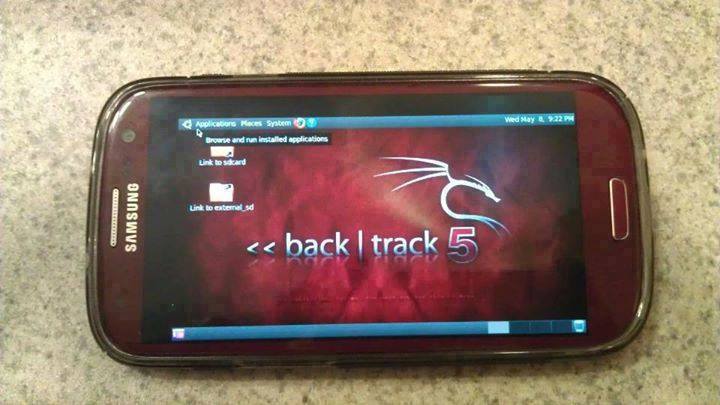
Guide you step by step to How to install and run Backtrack on android. As the Backtrack is also available with ARM architecture which makes it possible to run Backtrack on an ARM machine such as mobiles or tablets.
Recently, We are discussed Install and Run BackTrack on Windows. Android is the best OS for penetration testing. It designed for digital forensics and penetration testing or hacking tool. It comes with many more updated tools. As the Backtrack is also available with ARM architecture which makes it possible to run Backtrack on an ARM machine such as mobiles or tablets.
How To Install and Run Backtrack On AndroidRequirements
Step to Install and Run Backtrack On Android:
First of all extract the BT5-GNOME-ARM.7z. and copy the "BT5" folder and then put in your phone's root directory. Here mine phone is /sdcard. The root directory is different for different mobile devices.
  • Now install all the above apps Busybox, Android Terminal, Android Vnc.
  • After installing BusyBox application open it and wait until it finishes loading and then click on Smart install.
  • Now open the android terminal and type the following command:
    su cd /sdcard/BT5sh bootbtNOTE :- When you type su in terminal it will ask you for superuser request and you have to tap on Grant.
  • After this, type the following commands in terminal.
    export USER=rootvncpasswd
  • After entering vncpasswd the terminal will ask you to enter the password. Enter the desired password and hit enter.
  • Now type the following commands.
    tightvncserver -geometry 1280×720
  • The terminal emulator will create the localhost to connect it to VNC server. Now note the localhost port marked red below. Now minimize the terminal emulator.
  • Open the Android VNC and type the following settings.
Nickname : BT5
Password : your password here which you entered in terminal (step no.6)
Address : localhost
Port : 5906
NOTE: Make sure that your localhost's port matches with terminal's localhost. Here mine New 'X' desktop is localhost:6. You may be different. So, in VNC type Port 590X where the "X" is the localhost in the android terminal.
That's it now just tap on connect to run the Backtrack on your android. So in this way you successfully install and run backtrack 5 on android. If you face any problem feel free to discuss in below comments!

Continue reading


There is the number of applications which are not having the features of translating apps to your favorite languages. This makes it difficult for the users to translate apps into their native language. Today, I am going to tell you about an application which will help you to Automatically Translate Any Android App into Any Language.
Nowadays there are around hundreds of application on play store which is having the feature of translate but some applications don't have this features. This is just because they don't have proper developers or sometimes translators.
There is an application launched by Akhil Kedia from XDA Developer which made it possible for all the users to translate the application to any language you need. This is something which everyone needs it.
Akhil Kedia built an Xposed module in which users can easily change the language of any application to whichever they like or love. Personally, we all love English language but there are peoples in many parts of the world they are suitable for other languages.
Automatically Translate Any Android App into Any Language

Automatically Translate Any Android App into Any Language

The best part about this Xposed Module is that it translates the application to any language whichever you like and there are around many languages which you can try it. The other best part about this application is that the user interface which is amazing.
In an Android application, the best thing is the user interface. This is something which helps users to download the module or application to run again and again. There are about many settings which can be changed from the application.
The setup process is a bit different from other applications but if you will look at the application you will definitely love it. Just because of too many settings and features available in the application and you can turn it to any language without any crashing issues of the application.

Requirements:

  • Rooted Android Phone
  • Xposed Framework installed on your phone.
  • Android 5.0 or higher.
  • Unknown Source enabled (You might be knowing it)
How to Automatically Translate Any Android App into Any Language
  • Download the module called as All Trans from here: Download
Automatically Translate Any Android App
  • Now, after installation, it will ask you to reboot your phone to activate the module
  • Now, you need to get the API Key to get it you need to sign up with Yandex first so sign up: Yandex Sign up
Automatically Translate Any Android App
  • Then after sign up you will get the API key just enter the API key in the All-Trans application.
Automatically Translate Any Android App
  • Open All Trans Application and the swipe right to Global Settings.
Automatically Translate Any Android App
  • Click on Enter Yandex Subscription key and then enter your key.
Automatically Translate Any Android App
  • In Global Settings click on Translate from and select the Language the application is already in. (Eg: English)
Automatically Translate Any Android App
  • Now, click on translate to and select your favorite language. This will change the language.
Automatically Translate Any Android App
  • Swipe left and select the applications which you need to translate and done.
Automatically Translate Any Android App
  • After selecting just open the application and the language is translated automatically.
Automatically Translate Any Android App

Final Words:

This is the best and easy way to Automatically Translate Any Android App into Any Language. I hope you love this article.Share this article with your friends and keep visiting for more tips and tricks like this and I will meet you in the next one.
Stay Updated Tune IemHacker

Related links
  1. Hacker Tools For Pc
  2. Hacker Tools Apk Download
  3. Pentest Tools Port Scanner
  4. Tools Used For Hacking
  5. Pentest Reporting Tools
  6. Nsa Hacker Tools
  7. Hacking Tools For Pc
  8. Hack Tools
  9. Hacking Tools For Kali Linux
  10. Hacking Tools Hardware
  11. Hacking Tools Windows 10
  12. Hacker Tools Linux
  13. Hack Tools 2019
  14. Pentest Tools Open Source
  15. Pentest Reporting Tools
  16. Hacking Tools Name
  17. Tools For Hacker
  18. New Hack Tools
  19. Hacker Tools Windows
  20. Hacker Tools Apk Download
  21. Hacking Tools Online
  22. Hack Rom Tools
  23. Hack Tools For Ubuntu
  24. Tools 4 Hack
  25. Hacking Tools 2019
  26. Best Hacking Tools 2019
  27. Pentest Tools Nmap
  28. Hacking Tools Online
  29. Pentest Tools For Android
  30. Hacker Tools Free Download
  31. Hacking Tools Kit
  32. Pentest Box Tools Download
  33. Hacker Tools Github
  34. Pentest Tools Nmap
  35. Hacker Tools List
  36. Pentest Box Tools Download
  37. Hacking Tools Pc
  38. What Is Hacking Tools
  39. Hackers Toolbox
  40. Pentest Tools Online
  41. Hacking Apps
  42. Hack Tool Apk
  43. Pentest Tools Nmap
  44. Tools Used For Hacking
  45. Termux Hacking Tools 2019
  46. Pentest Tools Alternative
  47. Hacking Tools Github
  48. Hack App
  49. Hak5 Tools
  50. How To Install Pentest Tools In Ubuntu
  51. Pentest Tools Tcp Port Scanner
  52. Pentest Tools Website
  53. Hacking Tools Software
  54. Hacking Tools For Pc
  55. Pentest Tools Website
  56. How To Hack
  57. Hacker Tools Mac
  58. Pentest Tools For Ubuntu
  59. Hacking Tools For Mac
  60. Pentest Tools For Android
  61. Hack Tools Github
  62. Hack Tools Mac
  63. New Hacker Tools
  64. Hack Tools Mac
  65. Android Hack Tools Github
  66. Pentest Tools Download
  67. Tools For Hacker
  68. Bluetooth Hacking Tools Kali
  69. Pentest Box Tools Download
  70. Hacking Tools For Windows
  71. Hacker Tools For Pc
  72. Hack Tool Apk
  73. Hacker Tools Linux
  74. Pentest Tools Framework
  75. Ethical Hacker Tools
  76. Pentest Tools Website
  77. Github Hacking Tools
  78. Usb Pentest Tools